Blog › Why Is GPTBot Blocked on My Website?
13 Sep 2026 · AI Crawlers · 4 min read
Why Is GPTBot Blocked on My Website?
GPTBot is OpenAI's web crawler which is the one that fetches your content so it can appear in ChatGPT answers. If it's blocked, your site effectively doesn't exist to ChatGPT. Here's why it happens and how to find out if your website is blocking ChatGPT and GPTBot.
The most common reasons GPTBot gets blocked
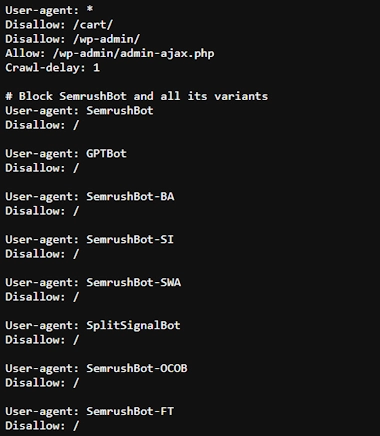
1. Your robots.txt explicitly blocks it
This is most straightforward cause of websites blocking GPTBot. Check your robots.txt file and look for any of these:
User-agent: GPTBot / Disallow: /- this means that GPTBot is directly blockedUser-agent: * / Disallow: /- this means that ALL bots are blocked from crawling your site including GPTBot
This can be intentional if a site owner has made a conscious choice to block AI training. The problem is that it often appears accidentally, for example if the developer copied the site over from a staging website which was blocking all bots and forgot to replace the robots.txt file, or the file was copied from a template, added by a plugin, or left over from a website migration. I've lost count of the number of times I've seen this in website migrations without any SEO support, the customer wonders why they've lost all their traffic afterwards, but no one checked if their robots.txt file was ok. UAWatch checks the robots.txt file each night and alerts you if anything has changed, so you can see within 24 hours of your robots.txt file being altered.
2. Cloudflare's "Block AI Scrapers" setting
Cloudflare has a one-click toggle in the dashboard called "Block AI Scrapers and Crawlers." When enabled, it blocks GPTBot, ClaudeBot, and other AI crawlers at the firewall level, which means that they are blocked before they ever reach your server. If this happens, you won't necessarily know. You won't see a clean 403 in your logs, it just drops the connection.
This setting is increasingly being enabled by default on some Cloudflare plans. If you use Cloudflare and didn't explicitly enable it, it's worth checking. The new Cloudflare rules coming into place on Tuesday 15th September 2026 may mean that you need to check your settings again after this date, as Cloudflare will be automatically block AI training and agent bots on ad-supported pages for new domains and existing free-tier users.
Find out in 2 minutes if GPTBot can reach your site.
UAWatch checks GPTBot and 123 other bots against your site every night, as well as your robots.txt rules and live HTTP response. You'll get an email overnight if anything changes.
Start monitoring — £10/site/month →3. A WAF rule catching it by user-agent
Web Application Firewalls (WAFs) including ones like Wordfence, NinjaFirewall, AIOS, or JetPack on WordPress, can block bots based on their user-agent string (UA string). A security update to your WAF can sometimes introduce new rules that catch AI crawlers as part of broader "bot blocking" policies. This means you could be blocking bots without even realising with your security settings.
4. Rate limiting triggering on the crawl
Some sites can trigger something called rate-limiting, which basically means that a user agent is crawling the site too fast. Request blocks are based on frequency or user-agent. GPTBot can trigger these speed limits, especially on smaller servers, resulting in 429 responses ("Too Many Requests") that prevent it from crawling the website fully.
5. A migration or infrastructure change
Server migrations, CDN changes, and security hardening are common causes of GPTBot being blocked. A rule that made perfect sense on the old website setup, such as blocking certain user agents for performance or security, gets carried across without anyone realising it now applies to legitimate AI crawlers too.
How to check if GPTBot is blocked right now
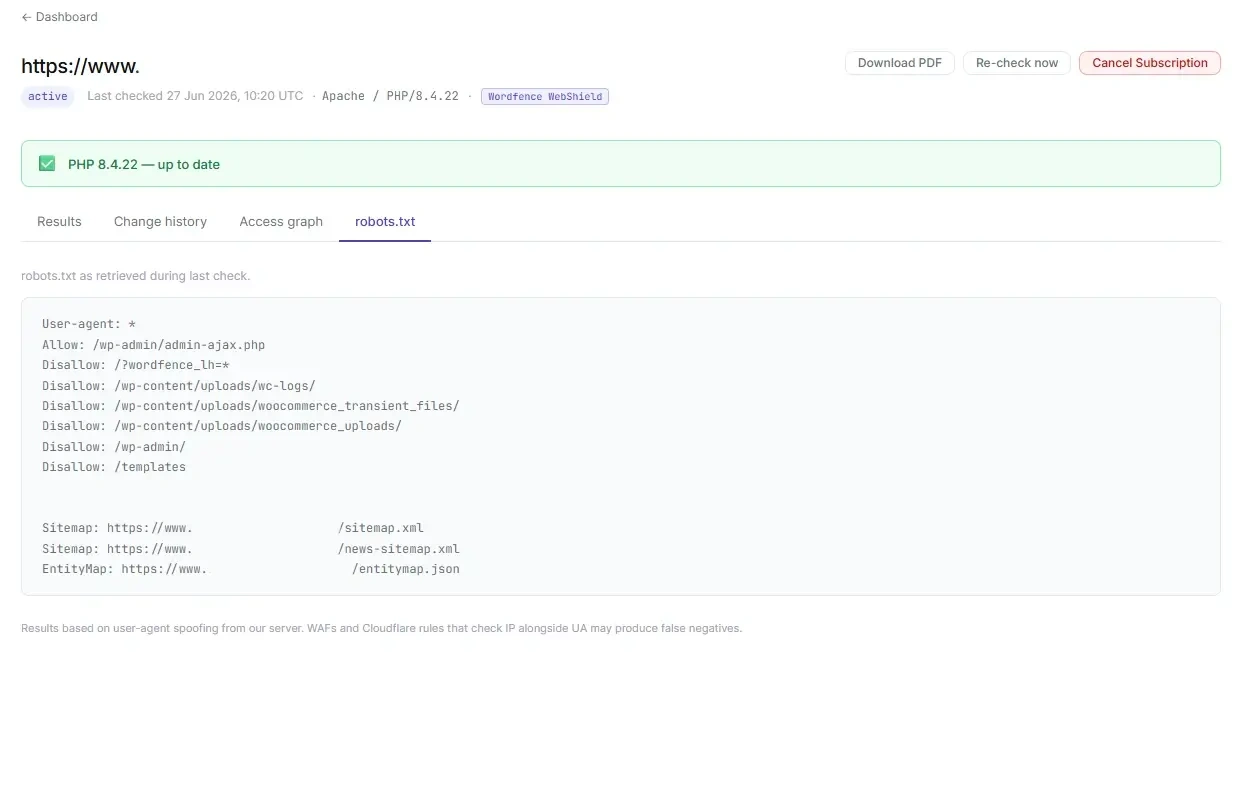
The quickest manual check is to look at your robots.txt directly: visit yourdomain.com/robots.txt in a browser and search for "GPTBot" or "GPT".
For WAF and Cloudflare blocks, it's harder, as you need to simulate a request using GPTBot's actual user-agent string and check what response you get. This is what UAWatch does automatically, checking all 124 bots each night and alerting you the moment anything changes.
Important: UAWatch tests using user-agent spoofing from our server IP. Firewalls like Cloudflare that verify both the user agent and the IP address may show false negatives — the bot appears allowed here but is blocked for real crawlers. If you see a 403 alongside an allowed robots.txt status, this is the most likely cause.
Find out in 2 minutes if GPTBot can reach your site.
UAWatch monitors 124 bots daily including GPTBot, ClaudeBot, Googlebot and Semrush, as well as robots.txt rules and live HTTP response. You'll get an email overnight when anything changes.
Start monitoring — £10/site/month →What happens if GPTBot stays blocked?
Your content won't appear in ChatGPT answers. As AI search grows and ChatGPT now handles hundreds of millions of queries, being invisible to GPTBot is the equivalent to being de-indexed from a major search engine. The impact on brand visibility and referral traffic is surprisingly significant.
Written by Kelly Sheppard, The Structured Data Company.